Dust building up in a computer is a common problem. The fans, graphics card and motherboard inside the case all collect dust. But did you know that cleaning with the wrong tool can damage electronic components? Electrostatic discharge (ESD) above 100V can damage a motherboard, memory or graphics card.
Why is a dedicated anti-static brush needed? What are the risks of an ordinary dust brush, a hair dryer or a damp cloth? This article explains in full why computer cleaning needs anti-static tools, recommends suitable anti-static brushes (industrial ESD grade; the brands and stores mentioned describe the Taiwan market), and illustrates the correct cleaning steps, so that you can clean your computer safely and effectively.
To learn how anti-static brushes prevent static, see How does an anti-static brush work? The science of anti-static dust removal explained. If you are still deciding which brand to buy, we suggest Anti-static brush recommendations | Anti-static brush brands compared and reviewed.
Why does computer cleaning need an anti-static brush?
The harm electrostatic discharge (ESD) does to electronic components
Electrostatic discharge (ESD) is a sudden transfer of charge between objects. The human body generates static simply by moving and rubbing. The shock you get from touching metal in winter is an ESD event.
To the human body, static of several thousand volts is only a slight sting. But to electronic components, as little as 100V can cause permanent damage.
3 kinds of damage ESD does to electronic components:
1. Immediate failure (Catastrophic Failure)
- Voltage: 500-2,000V and above
- What happens: the component burns out at once and cannot be used at all
- Components commonly affected: motherboard chips, memory, CPU, graphics card GPU
- Characteristic: the fault is clearly noticeable
2. Latent damage (Latent Damage)
- Voltage: 100-500V
- What happens: tiny internal damage; the component still works in the short term, but its life is greatly shortened
- The problem: the user cannot notice it and thinks all is well after cleaning, then it fails suddenly weeks or months later
- This is the most common kind of ESD damage and the hardest to guard against
3. Parameter degradation (Parameter Degradation)
- Voltage: 50-100V
- What happens: component performance drops, such as slower memory reads and writes or lower graphics card performance
- The problem: it is hard to attribute, and may be mistaken for the computer aging
Sources of static risk when cleaning a computer
Risk 1: static on the human body
- The body generates static as it moves, reaching 10,000-15,000V in winter
- Touching the motherboard, graphics card or memory directly can cause ESD
Risk 2: static generated by a hair dryer
- The high-speed airflow of a hair dryer generates a large amount of static
- Never use a hair dryer to clean the inside of a computer
Risk 3: friction static from an ordinary brush
- An ordinary plastic brush generates static by friction as it brushes
- The accumulated static discharges into electronic components in an instant
- This is why an "anti-static brush" is needed and not an ordinary dust brush
Risk 4: a dry environment makes static worse
- Relative humidity in the Taiwanese winter can fall as low as 40-50%
- The lower the humidity, the more easily static is generated and accumulated
- Cleaning a computer in winter carries a higher risk
How an anti-static brush protects
The filaments of an anti-static brush contain conductive fibers. The principle is:
- Draining static from the body: when you hold the handle, static on your body is conducted away through the conductive fibers
- Preventing friction static from building up: static generated while brushing is conducted away at once and does not accumulate
- Providing electrostatic shielding: the filaments themselves do not generate static, which protects the electronic components
A professional anti-static brush should meet the ESD standard (IEC 61340). A suitable resistance range conducts static away without letting the current become large enough to cause other problems.
An ordinary dust brush has a surface resistance above 10^11 ohms and has no anti-static capability at all.
For a deeper look at how anti-static protection works, see How anti-static brushes work: an in-depth explanation.
Recommended anti-static brushes for computer cleaning
Recommendation: industrial ESD-grade anti-static brushes (the professional's first choice)
Product features:
- Industrial-grade specification, with strict ESD certification
- A mix of stainless steel conductive wire and soft fiber
- A strong anti-static effect
- Supplied with an inspection report
- Price: high
Where it fits:
- Professional computer repair work
- Server cleaning
- Maintenance of expensive gaming PCs
- Studios / corporate IT departments
Advantages:
- The best anti-static effect, fully meeting industrial standards
- The most stable quality, with very little variation between batches
- The highest durability, lasting 2-3 years
- Supplied with an inspection report, so it is traceable
Disadvantages:
- A higher price
- Fewer places to buy it (professional electronic materials stores)
Who should buy industrial ESD grade?
- Professional computer repair businesses
- Corporate IT departments
- Owners of expensive gaming PCs (NT$50,000 and above)
- Those who want the highest safety standard
❌ Not recommended: budget dust brushes from Daiso / Showba
Why not?
The budget dust brushes from Daiso and Showba (a Taiwanese household goods chain) are labeled "anti-static", but tests show:
- A surface resistance of about 10^10 ohms, with an anti-static ability that relies only on a surface coating of anti-static agent, not real conductive fiber
- The coating wears off over time and is almost ineffective after 3-6 months
Risk assessment:
- For everyday desk cleaning → low risk, acceptable
- For cleaning the outside of a computer case → medium risk, just about usable
- For the inside of a computer case → high risk, not recommended
Advice:
- If you are only cleaning the keyboard surface, the screen bezel and the outside of the case → a budget product is just about usable
- If you are cleaning inside the case → be sure to use an anti-static brush made of conductive fiber (industrial ESD grade is recommended for professional repair work or expensive computers)
Saving a little money at the risk of burning out a motherboard is a very poor bargain. A desktop motherboard is not cheap. By comparison, a professional anti-static brush is a very worthwhile investment.
For a detailed test of budget dust brushes, see Daiso / Showba anti-static brushes tested.
The complete steps for cleaning a computer (illustrated guide)
Preparation before cleaning (5 important steps)
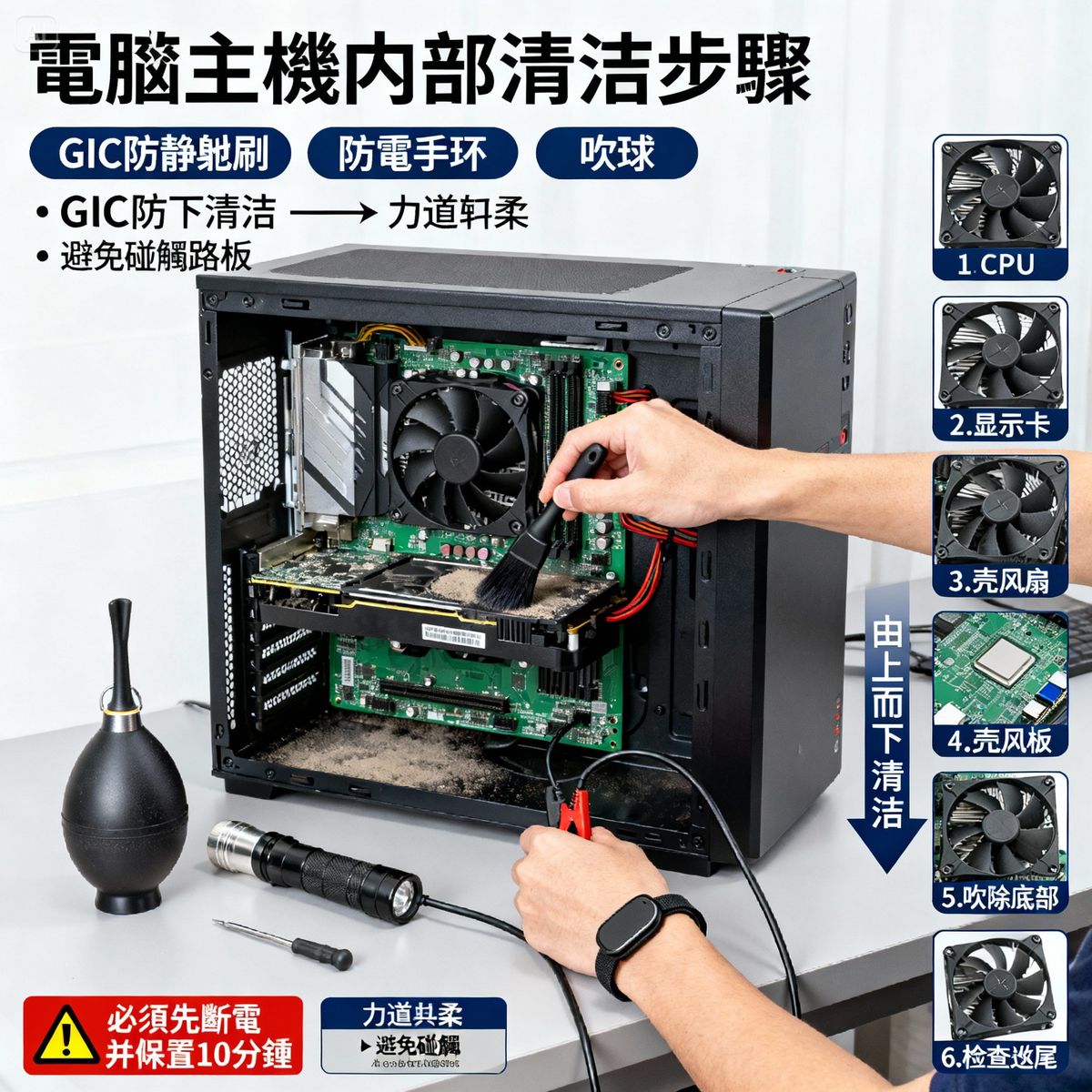
Step 1: shut down and disconnect the power
- Shut down Windows
- Switch off the power supply unit
- Unplug the power cord
- Important: not hibernate or sleep, but a full shutdown
Step 2: wait 10 minutes
- Let the capacitors discharge
- Make sure no charge remains in the motherboard or graphics card
- This step is very important; do not rush it
Step 3: put on an anti-static wrist strap (recommended)
- A grounded anti-static wrist strap drains static from the body
- Budget priced, very cheap
- Gives double protection (anti-static brush + anti-static wrist strap)
If you do not have an anti-static wrist strap, touch a metal object (such as a faucet) before cleaning to drain the static from your body.
Step 4: move to a well-ventilated place
- Cleaning raises dust
- A balcony, hallway or other ventilated place is best
- Avoid cleaning in a closed room
Step 5: prepare the tools
- Anti-static brush (conductive fiber; choose industrial ESD grade for professional use)
- Large air blower (photography type)
- A flashlight or phone light (to see inside)
- A clean table top or cloth mat
💼 Bulk purchase discounts for corporate IT departments
If you need:
- Batch purchases for an IT department of anti-static brushes (for maintaining company computers)
- Bulk purchases of professional tools for a computer repair business
- Anti-static brushes to a custom specification (special length / stiffness / handle design)
YC Brushes - over 40 years of professional manufacturing experience
- ✅ ESD anti-static certified, compliant with the IEC 61340 standard
- ✅ Customizable to your needs (carbon fiber / conductive fiber / mixed materials)
- ✅ Order quantities are quoted per specification, with wholesale discounts on bulk purchases; email us your requirements
- ✅ Inspection reports provided, with traceable quality
Ask for a quote now
- 📞 Phone: +886-2-2988-2721
- 📧 Email: [email protected]
- 🌐 Online form: Contact YC Brushes
Factory-direct × professional certification × wholesale discounts
Steps for cleaning inside the case
Step 1: open the side panel of the case
- The side panel is usually fixed with screws
- Some cases have a quick-release design
- Once it is open you can see the motherboard, graphics card and power supply unit
Step 2: check by eye where the dust is
- Use a flashlight
- Main areas of dust build-up: CPU fan, graphics card fans, case fans, power supply fan, motherboard surface
Step 3: the top-to-bottom rule
- Start cleaning at the very top
- Let the dust fall downward
- Deal with the dust at the bottom last
Step 4: CPU fan and heatsink
- Brush the dust off the fan blades gently with the anti-static brush
- Brush out the dust between the heatsink fins
- Use an air blower to blow out the deeper dust
- Use light pressure so the fan blades do not deform
Step 5: graphics card fans and fins
- The graphics card is the part that collects dust most easily
- Brush the dust off the fan blades
- Clean the fins with the anti-static brush
- Blow out the deeper dust with the air blower
- Note: do not touch the electronic components on the PCB
Step 6: case fans
- The front-panel intake fans carry the most dust
- Brush the dust off the fan blades and frames
- Clean the rear exhaust fan too
Step 7: motherboard surface
- Brush across the surface of the motherboard extremely lightly
- Avoid protruding components such as capacitors and chips
- Remove only the obvious dust; do not over-brush
- Deal with dust in the memory slots and PCI-E slots with the air blower
Step 8: power supply unit (as appropriate)
- If the power supply unit can be removed, take it out and clean it
- If it cannot be removed, blow the dust out through the vents with the air blower
- Opening up the inside of a power supply unit is not recommended (high voltage, dangerous)
Step 9: removing the dust at the bottom
- Finally, blow out the dust that has collected at the bottom with the air blower
- Or remove it with a small USB vacuum cleaner
- Do not use an ordinary vacuum cleaner (the suction is too strong and it generates static)
Step 10: check and finish
- Check by eye that every component is clean
- Make sure no tools or foreign objects are left inside the case
- Put the side panel back and tighten the screws
- Plug in the power cord and power on to test
5 things never to do when cleaning a computer (must read)
❌ Never 1: use a hair dryer
Why not?
- The high-speed airflow of a hair dryer generates a large amount of static
- An instantaneous discharge may burn out electronic components
- Hot air harms plastic parts
The right alternatives: a large photography air blower, a USB air duster made for computers, a can of compressed air (keep it upright in use)
❌ Never 2: use a damp cloth
Why not?
- Moisture causes short circuits
- Residual moisture causes corrosion
- Damp attracts more dust
- The motherboard and graphics card must never come into contact with water
The only exception: the outer shell of the case can be wiped with a slightly damp cloth (make sure it is completely dry before refitting)
❌ Never 3: use an ordinary vacuum cleaner
Why not?
- The suction is too strong and may suck up small parts (jumper caps)
- A vacuum cleaner generates a large amount of static
- The nozzle may knock into and break components
The right alternative: a small USB vacuum cleaner made for computers (moderate suction, anti-static design)
❌ Never 4: clean without disconnecting the power
Why is it dangerous?
- With the power still connected, the capacitors still hold charge
- Touching a component by mistake may give an electric shock (high voltage inside the power supply unit)
- Risk of short circuit
The right way: shut down → disconnect the power → unplug the power cord → wait 10 minutes → then clean
❌ Never 5: touch electronic components directly
Why is it not recommended?
- Static on the body may damage components
- Sweat and skin oils contaminate the contacts
- You may loosen a part by accident
The right way: wear an anti-static wrist strap, clean with an anti-static brush, and do not touch the motherboard / graphics card / memory gold contacts directly with your hands
Suggested tool sets for computer cleaning
Basic set (budget)
Suited to: ordinary users, cleaning once every six months
Tool list:
- Conductive fiber anti-static brush (mid-range)
- Large photography air blower (budget)
- Anti-static wrist strap (budget)
Total outlay: obtainable in the budget range
This set can safely clean the inside of a computer case, the keyboard and the screen. It is the best value for money.
Advanced set (mid-range)
Suited to: computer enthusiasts, gamers, cleaning once a quarter
Tool list:
- Conductive fiber anti-static brush (mid-range)
- Large photography air blower (budget)
- Anti-static wrist strap (budget)
- USB vacuum cleaner made for computers (mid-range)
- Microfiber cloth set (budget)
- Screen cleaner (budget)
Total outlay: in the mid-price range
A more complete tool set, with better cleaning results.
Professional set (mid-to-high price)
Suited to: professional repair businesses, corporate IT departments, high-end users
Tool list:
- Industrial ESD-grade anti-static brush (high price)
- Large photography air blower (budget)
- Anti-static wrist strap (budget)
- USB vacuum cleaner made for computers (mid-range)
- Compressed air can set (mid-range)
- Microfiber cloth set (budget)
- Keycap puller (budget)
- Anti-static work mat (mid-range)
Total outlay: in the mid-to-high price range
The most professional and complete setup, suited to frequent cleaning or commercial use.
How often to clean a computer
Ordinary environments (office / home)
Suggested frequency: once every 6 months
Criteria:
- The fans get louder (dust hinders their rotation)
- Temperatures rise (cooling becomes less efficient)
- Startup becomes clearly slower
Dustier environments (ground floor / beside a road / pet owners)
Suggested frequency: once every 3 months
Criteria:
- Obvious dust on the intake fans
- A visible layer of dust inside the case
- Temperature monitoring software shows higher temperatures
Gaming PCs / high-performance workstations
Suggested frequency: once every 3 months
Reasons:
- High performance generates more heat
- The fans spin faster and draw in more dust
- Temperature control matters more
Servers / equipment running 24 hours a day
Suggested frequency: once every 2-3 months
Reasons:
- Continuous running means dust builds up fast
- The cooling demand is extremely high
- Downtime is costly, so preventive maintenance matters
Indicators that it is time to clean
5 signs that cleaning is due:
- The fans are clearly louder
- CPU/GPU temperatures are 10°C or more above normal
- Startup / software launch is clearly slower
- Dust is visible on the outside of the case (it is worse inside)
- More than 6 months have passed since the last cleaning
When 2 or more signs appear, it is time to clean.
For more on where to buy anti-static brushes, see Where to buy an anti-static brush? 10 sales channels compared on price, with current offers to find the channel that suits you best.
Conclusion: the right tools + the right method = safe, effective computer cleaning
Cleaning a computer is not just a matter of removing dust. Static protection is the most important consideration. Electrostatic discharge (ESD) above 100V can damage electronic components. Hair dryers, ordinary dust brushes and damp cloths all carry serious risks.
3 core points:
- Use a professional anti-static brush: choose an anti-static brush made of conductive fiber, and industrial ESD grade for professional repair work
- Follow the correct cleaning steps: disconnect the power → wait → wear an anti-static wrist strap → clean from top to bottom
- Avoid the 5 things never to do: hair dryers, damp cloths, ordinary vacuum cleaners, cleaning with the power connected, touching components directly
Investment advice:
- Basic set: budget (ordinary users)
- Advanced set: mid-range (computer enthusiasts)
- Professional set: mid-to-high price (repair businesses)
Set against the value of the computer, investing in a set of professional cleaning tools is well worth it. The repair bill for a single case of ESD damage far exceeds the cost of the tools.
Regular cleaning can:
- Extend the life of the computer by 2-3 years
- Lower temperatures by 10-20°C
- Reduce fan noise
- Prevent sudden failures
The right tools and method make cleaning both safe and effective.
Does your corporate IT department need to buy professional anti-static brushes in bulk? Contact YC Brushes. With over 40 years of manufacturing experience and ESD certification, we offer wholesale discounts and a custom service.
FAQ
Can a Daiso dust brush be used to clean a computer?
Not recommended for the inside of a computer case. The Daiso dust brush has a surface resistance of about 10^10 ohms, and its anti-static ability relies only on a surface coating of anti-static agent, not real conductive fiber. The coating wears off over time and is almost ineffective after 3-6 months. For cleaning the keyboard surface, the screen bezel and the outside of the case, the risk is lower and it is just about usable, but never use it to clean inside the case (graphics card, motherboard, memory). Set against the value of a motherboard, investing in a professional anti-static brush is the sensible choice.
Can a hair dryer be used to clean a computer?
Absolutely not! This is the most common mistake and the most dangerous. The high-speed airflow of a hair dryer generates a large amount of static, and an instantaneous discharge may burn out electronic components such as the motherboard, memory and graphics card. Hot air also harms plastic parts. The right alternatives: a large photography air blower (budget), a USB air duster made for computers, or a can of compressed air (keep it upright in use so that no liquid sprays out).
Is an anti-static wrist strap essential when cleaning a computer?
It is strongly recommended, but there is an alternative if you do not have one. The body generates static as it moves, reaching 10,000-15,000V in winter, and touching electronic components directly may cause ESD damage. Once grounded, an anti-static wrist strap (budget) continuously drains static from the body and gives the safest protection. If you do not have one, touch a metal faucet or a metal part of the case before cleaning to drain the static from your body, but this is only temporary: static builds up again as soon as you move. Using an anti-static brush + an anti-static wrist strap gives double protection and is the ideal.
How often should a computer be cleaned?
It depends on the environment. Ordinary environments (office / home): once every 6 months. Dusty environments (ground floor / beside a road / pet owners): once every 3 months. Gaming PCs / high-performance workstations: once every 3 months. Servers / 24-hour equipment: once every 2-3 months. Signs to look for: (1) louder fans; (2) temperatures up by 10°C or more; (3) slower startup; (4) visible dust build-up; (5) more than 6 months since the last cleaning. When 2 or more signs appear, it is time to clean. Regular cleaning can extend the life of the computer by 2-3 years.
Which parts matter most when cleaning a computer?
5 key areas: (1) CPU fan and heatsink - they directly affect CPU temperature, and blockage by dust leads to overheating. (2) Graphics card fans and fins - the most important for gamers, as they affect gaming performance. (3) Case intake fans - the front intake fans carry the most dust and are the main source of dust. (4) Power supply fan - blockage by dust may lead to overheating and damage. (5) Motherboard surface - dust build-up affects cooling. Cleaning order: top to bottom, letting the dust fall downward, and dealing with the dust at the bottom last. An anti-static brush + air blower gives the best results.
Can I clean a laptop myself?
You can clean the outside and the vents, but taking the inside apart yourself is not recommended. A laptop is tightly built and hard to disassemble, and you may lose the warranty. What you can clean yourself: (1) the keyboard surface and gaps; (2) the screen; (3) the outside of the body; (4) the vents (blow from the outside with an air blower). What is not recommended to clean yourself: (1) the internal fan and heatsink fins; (2) the motherboard; (3) the area around the battery. If the laptop runs too hot or the fan is loud, send it to the manufacturer or a professional repair shop for a deep clean. The risks of taking it apart yourself: (1) losing the warranty; (2) breaking the clips; (3) the many screw sizes are easy to mix up.
Can water or detergent be used to clean a computer?
Absolutely not inside the case! Moisture causes short circuits, and detergent may corrode the circuits. The motherboard, graphics card, memory and power supply unit must never come into contact with water. The only parts where water can be used: (1) the outer shell of the case - it can be wiped with a slightly damp cloth; make sure it is completely dry before refitting. (2) keyboard keycaps - once pulled off they can be washed in clean water, then refitted when completely dry. Parts that must not touch water: the motherboard, graphics card, memory, CPU, power supply unit, fan motors, hard drives, SSDs and all electronic components. The correct way to clean: anti-static brush + air blower. Completely dry cleaning is the safest.
What should I watch out for when using a can of compressed air?
3 important points: (1) Keep it upright - spraying at a tilt releases liquid refrigerant, and liquid touching electronic components may damage them. (2) Keep your distance - at least 10-15 cm away; too close and the pressure may blow small parts off. (3) Spray in short bursts - do not spray continuously for long, as the can ices up and becomes less effective. Advantages: strong pressure, good at clearing deep dust. Disadvantages: (1) it has to be bought again and again (a consumable); (2) there are risks if it is used wrongly; (3) the price is mid-range per can. By comparison, an air blower (budget) is reusable, more economical and greener, and is enough for ordinary cleaning. Compressed air cans are suited to professional deep cleaning.
Are there discounts when a corporate IT department buys anti-static brushes in bulk?
Yes! Companies buying in batches can enjoy factory-direct wholesale discounts. YC Brushes offers a professional program for corporate IT departments: (1) Bulk purchasing - the larger the quantity, the bigger the discount; quantities and wholesale pricing are quoted per specification, so email us your requirements. (2) Custom specifications - the filament material (carbon fiber / conductive fiber / mixed), length, stiffness and handle design can be adjusted to your needs. (3) ESD certification - compliant with the IEC 61340 standard, with an inspection report supplied. (4) Stable quality - over 40 years of manufacturing experience and consistent quality from batch to batch. Suitable for: corporate IT departments, computer repair businesses, school computer labs and internet cafe operators. Inquiries: phone +886-2-2988-2721 or the online contact form.